Smart care. Better days.
One care record.
Everyone who's helping.
A family caring for a parent ends up running six apps. AgeCare replaces them with one shared record of medications, health, visits, documents and messages — each person sees only what the family has shared.
Built with families, seniors and professional caregivers.


Everything you need in one place
One shared record instead of six apps, designed to make care simple for everyone helping.
Family collaboration
Everyone helping stays connected around one shared record.
Medication management
Schedules, reminders and per-dose confirmation, not just alarms.
Health tracking
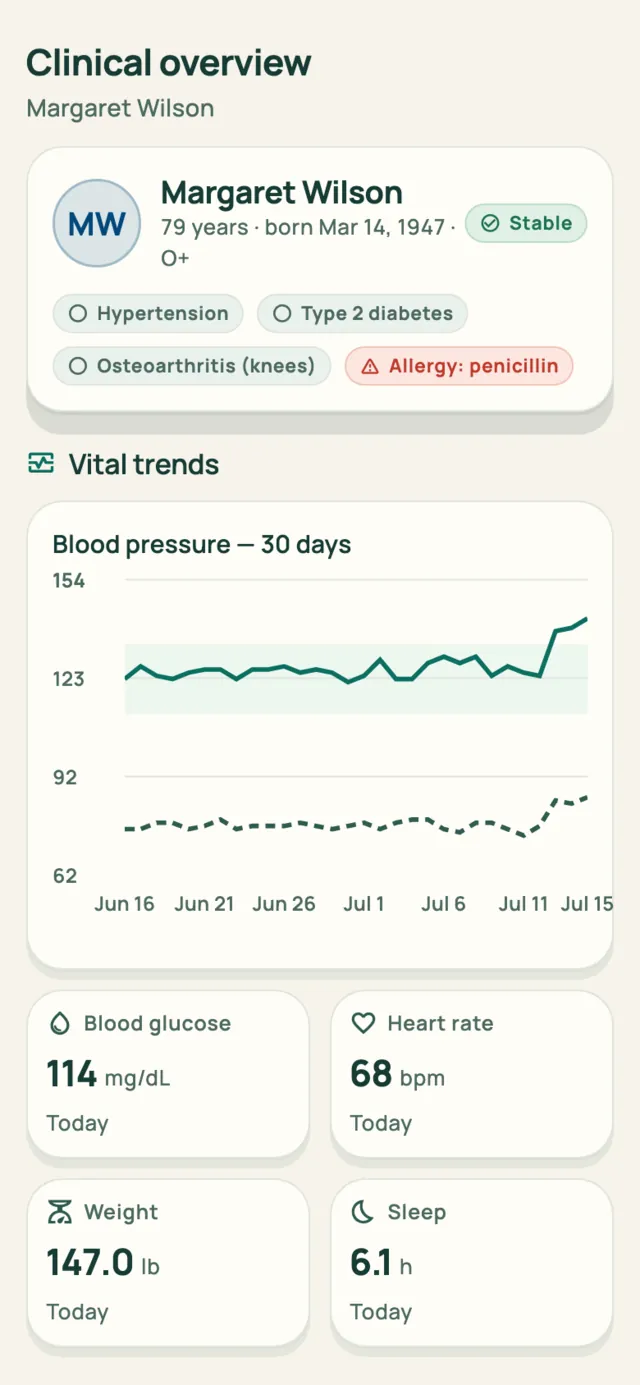
Readings compared with her own baseline, never a diagnosis.
Secure & private
Ten permissions the family controls. Health data is never sold.
The film
See AgeCare in action
The night something happens, the questions nobody can answer at 3am, and the morning a family finally reads from the same page.
The problem
Six apps, none of them talking
A pill reminder. A blood-pressure tracker. A shared calendar. A group chat. A folder of scanned documents. Whatever portal the home-care agency provides.
Your parent doesn't open any of them. The caregiver writes into the agency's system, the doctor sees none of it, and the sibling two towns away has no idea what happened yesterday.
That is how a missed dose goes unnoticed, an appointment catches everyone unprepared, and a family slowly loses confidence that their parent is safe at home.
What one record changes
- Margaret confirms her medication on her own phone, and the alert on her daughter's dashboard clears. The timeline shows who confirmed it and when.
- Emily sends a reminder, Margaret sees it, and it can't accidentally be sent twice.
- Maya finishes her caregiving visit, and the family reads her summary within seconds.
- Emily changes what the doctor can see, and his very next screen reflects it.
What it does
One app for the whole week of care
Medications, health, tasks, messages and safety, together in one place.
01 · Medications
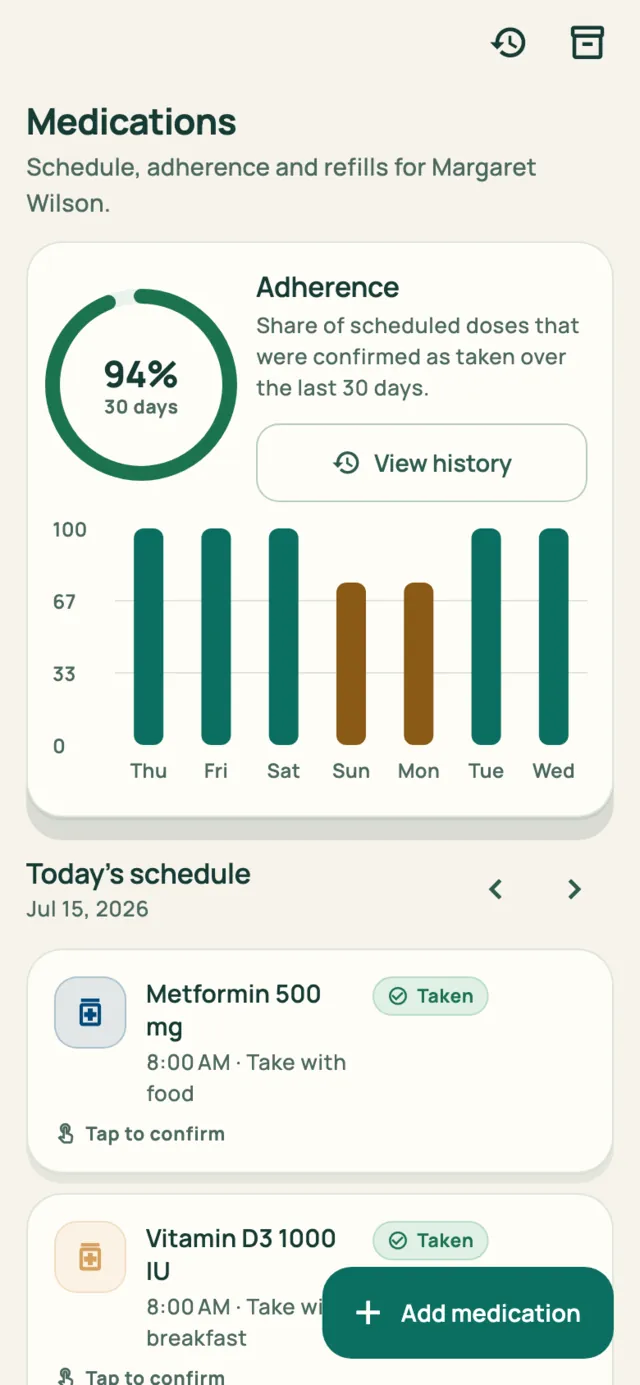
Medications that get confirmed, not just scheduled
The day's schedule, refill tracking and adherence history. Your parent confirms each dose themselves, and when one is missed, the family can send a reminder or check in.
- Per-dose confirmation with a clear "taken" record
- Missed-dose alerts with remind, confirm, skip or escalate
- 30-day adherence, per medication and overall
- Refill countdown before the bottle runs out

02 · Health
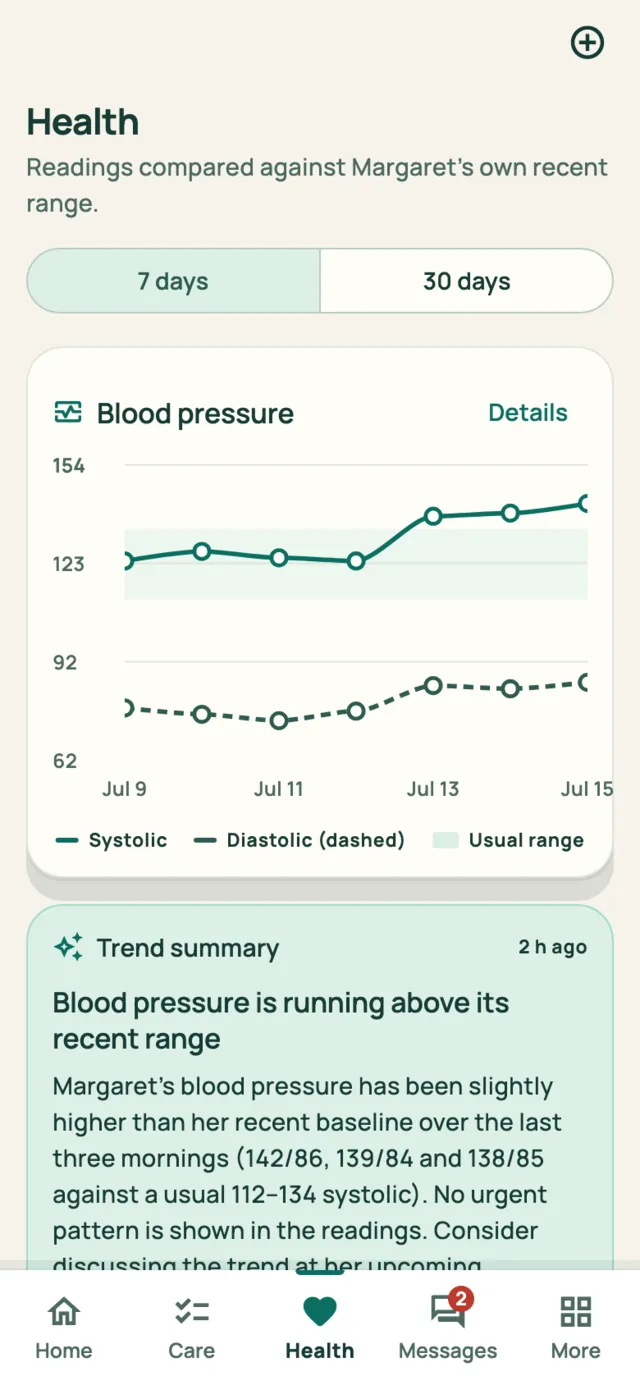
Health measured against her own baseline
Six health measures over the last week or month, each compared with your parent's own recent range. The app will say a reading is slightly above usual and leave words like high to her doctor.
- Blood pressure, glucose, heart rate, weight, sleep, activity
- Every reading labeled with where it came from
- Plain-language trend summaries you can hand to a doctor
- Charts with spoken summaries for screen readers
03 · Care plan
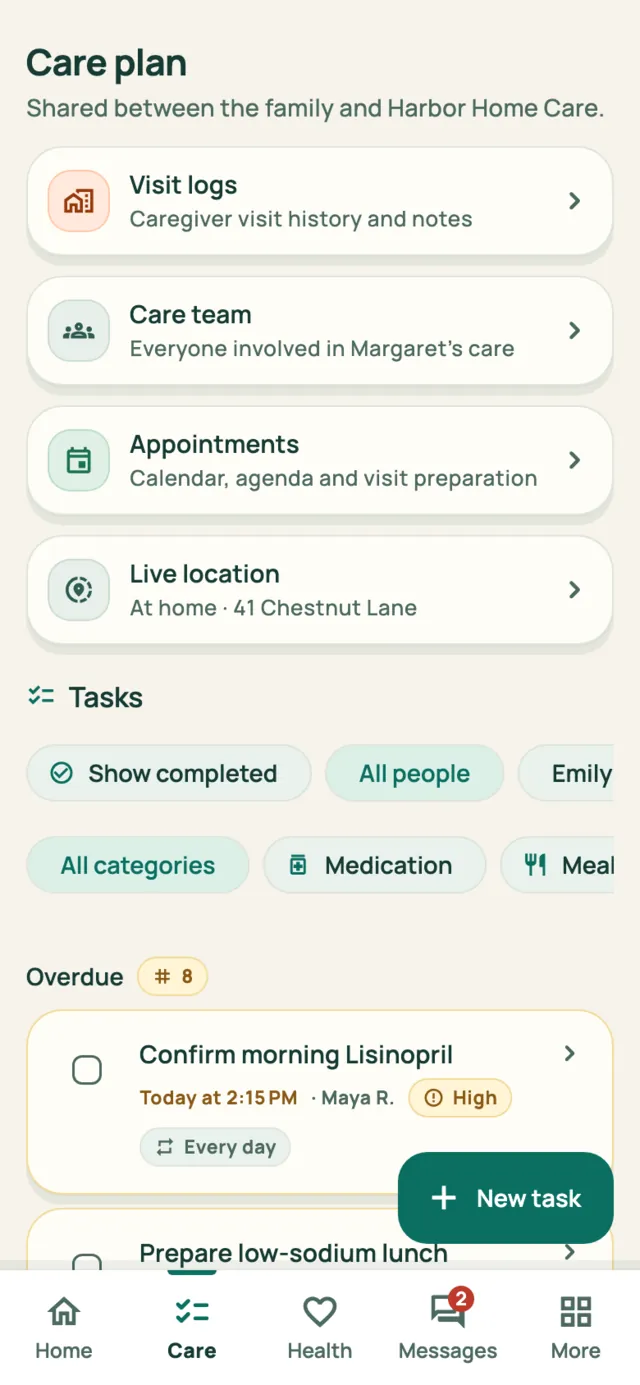
A care plan the whole team can see
Tasks grouped by overdue, today and upcoming, each with comments and a history of who did what. Visit logs, the care-team directory and appointment preparation live beside them.
- Assign tasks to a person or leave them open to anyone
- Caregiver visit notes and vitals land in the same record
- Appointment prep: questions, transport, documents, checklist
04 · Messages
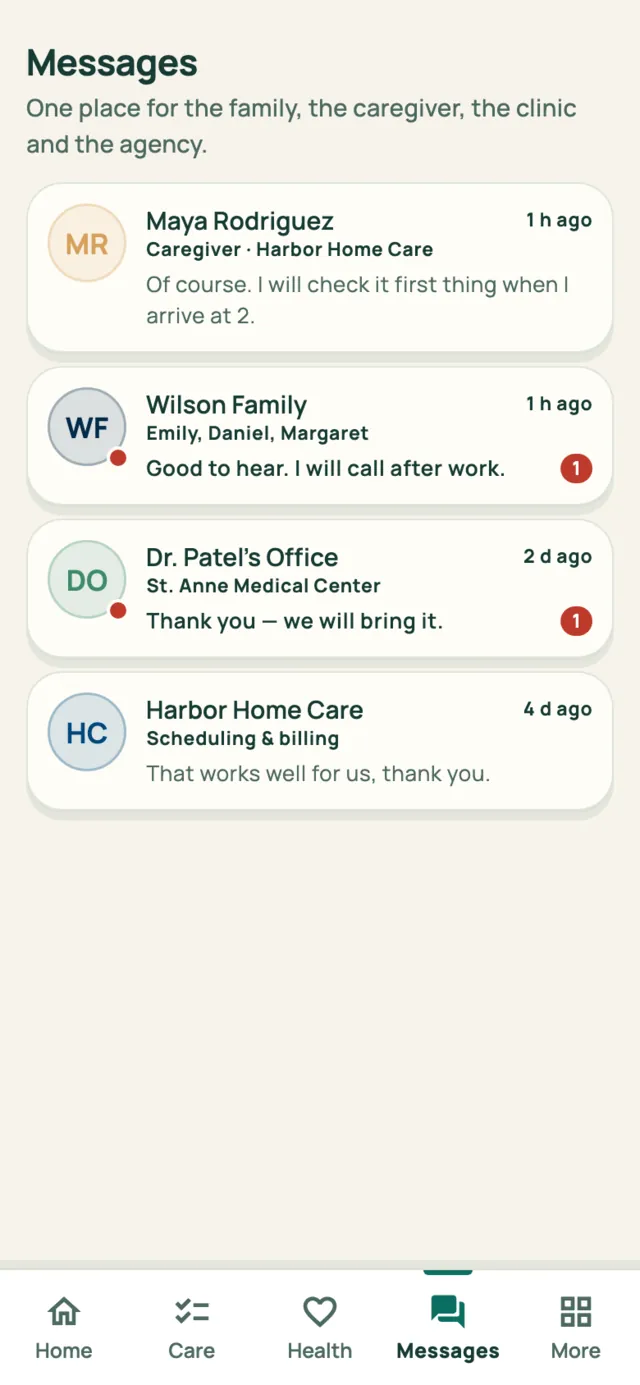
One thread instead of four group chats
The family, the caregiver, the clinic and the agency in one place, with structured cards for the things that matter, so a confirmed dose or a completed visit isn't buried in conversation.
- One unread count across every conversation
- Visit summaries and dose confirmations posted automatically
- Documents attached to the conversation they belong to
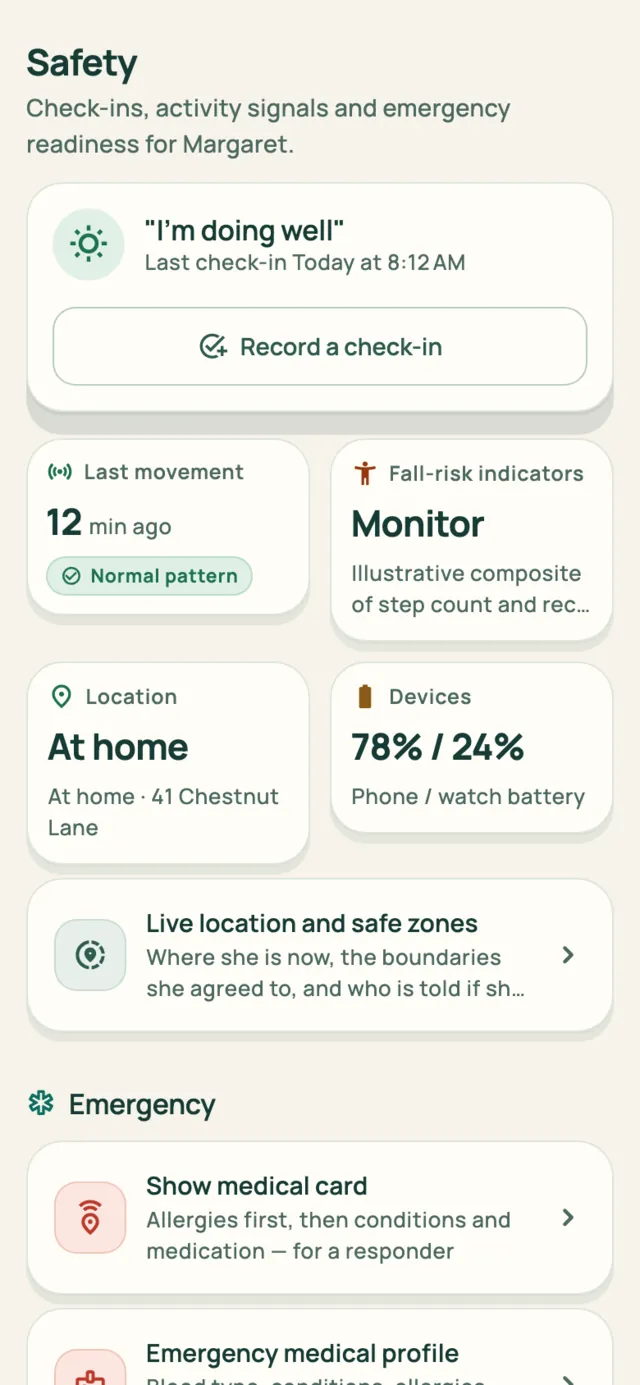
05 · Safety
Safety, prepared before it's needed
Daily check-ins, activity signals, device batteries, and an emergency medical profile with allergies, conditions, medications and insurance, all kept up to date so the information is there if something happens.
- Wellness check-in the senior can complete in one tap
- Emergency contacts with priority and notify flags
- A medical card built for whoever is treating her
- A guided emergency workflow you can rehearse safely
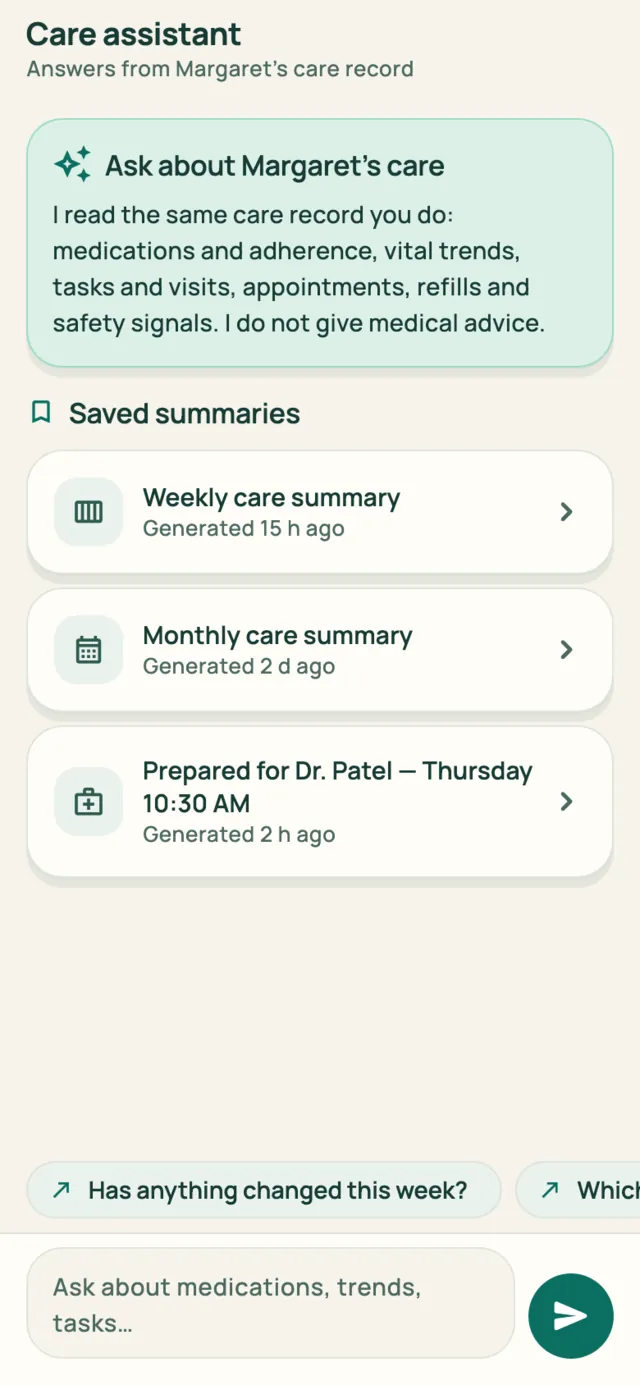
06 · Assistant
Answers drawn from the record, with the sources shown
Ask what changed this week and get an answer composed from the same care record you can open yourself, with the signals it used listed underneath. Weekly, monthly and visit-prep summaries are saved for you.
- Every answer cites the readings and events behind it
- When something needs attention, it says why and what to do next
- It never predicts and never diagnoses
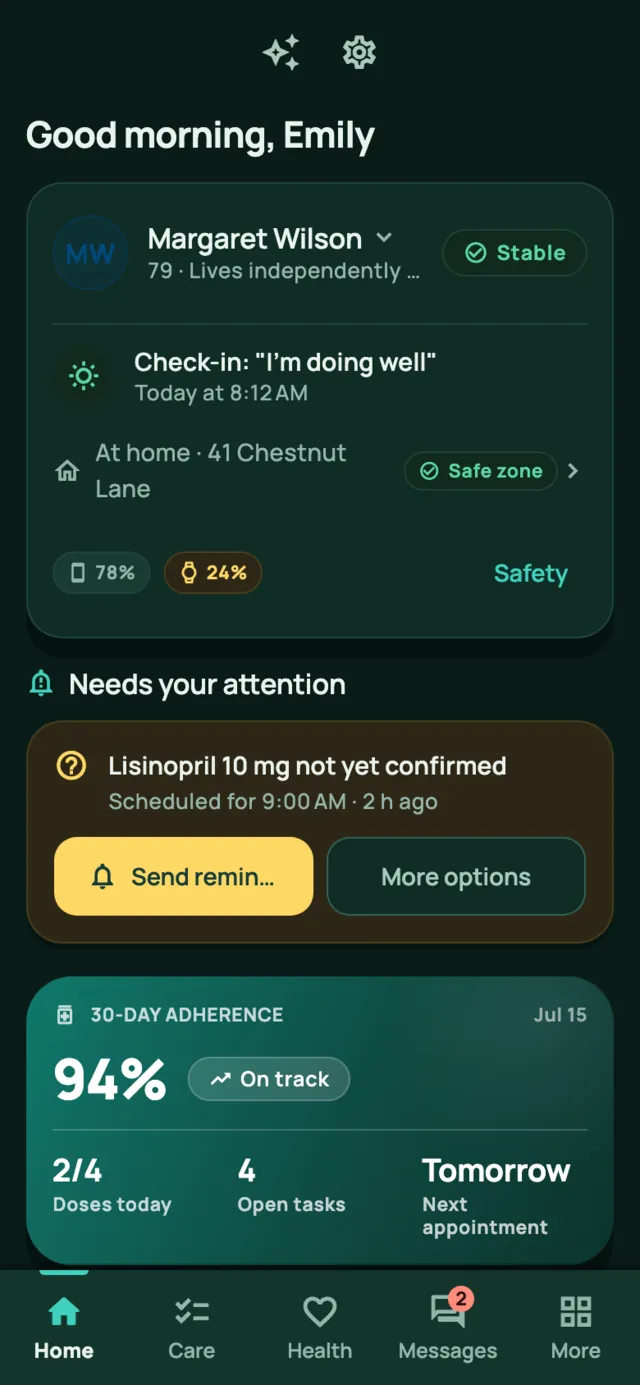
07 · Appearance
Light and dark, in every role
Plenty of people check on a parent at 5 AM. Dark mode is the same interface in a calmer palette, easier on the eyes at that hour, and both themes are kept easy to read.
- Follows the device by default; pick Light or Dark any time
- Available in every role, including the senior interface
- Status shown by icon and words, never color alone
Watches
Her watch already knows. Now the family does too.
Heart rate, blood oxygen, sleep and steps flow from her watch into the same care record as everything else. And when something changes, somebody hears about it.

Works with the watch she already wears
An Apple Watch connects through Apple Health, and a Pixel or Galaxy Watch through Health Connect. Connecting takes one permission prompt on her phone, and her readings appear in the record alongside her medications and visits.
- Heart rate, blood oxygen, sleep and steps, each with the time it was measured
- Every signal has its own on/off switch. Turn off anything she'd rather not share and it stops arriving
- Watch battery and last sync are always visible, so you know when it needs charging


Told when her heart rate leaves her usual range, or stops arriving
AgeCare learns her usual range from her own last 30 days of readings. It tells the family about two things: a stretch of readings outside that range, and a watch that has stopped reporting.
- A single odd reading, like a flight of stairs, is ignored
- A silent watch usually means a flat battery, so it is reported as a gap in coverage rather than a health concern
- The alert sounds on the phones of whoever you choose: her contacts, her doctor, or a 24-hour care line
Watch readings arrive a few minutes behind, so this notices patterns rather than moments. It is not an emergency alarm, and the app says so.


In the moment
Ready if something goes wrong
If she falls and can't speak for herself, whoever arrives still needs to know she is allergic to penicillin. Three features cover that moment.


A medical card for whoever is treating her
One tap from the home screen. Allergies come first, in the largest type, then conditions, current medication with doses, who to call, and the preferred hospital. There are no menus and nothing to expand, and it stays legible at arm's length.

A check-in that answers itself if she can't
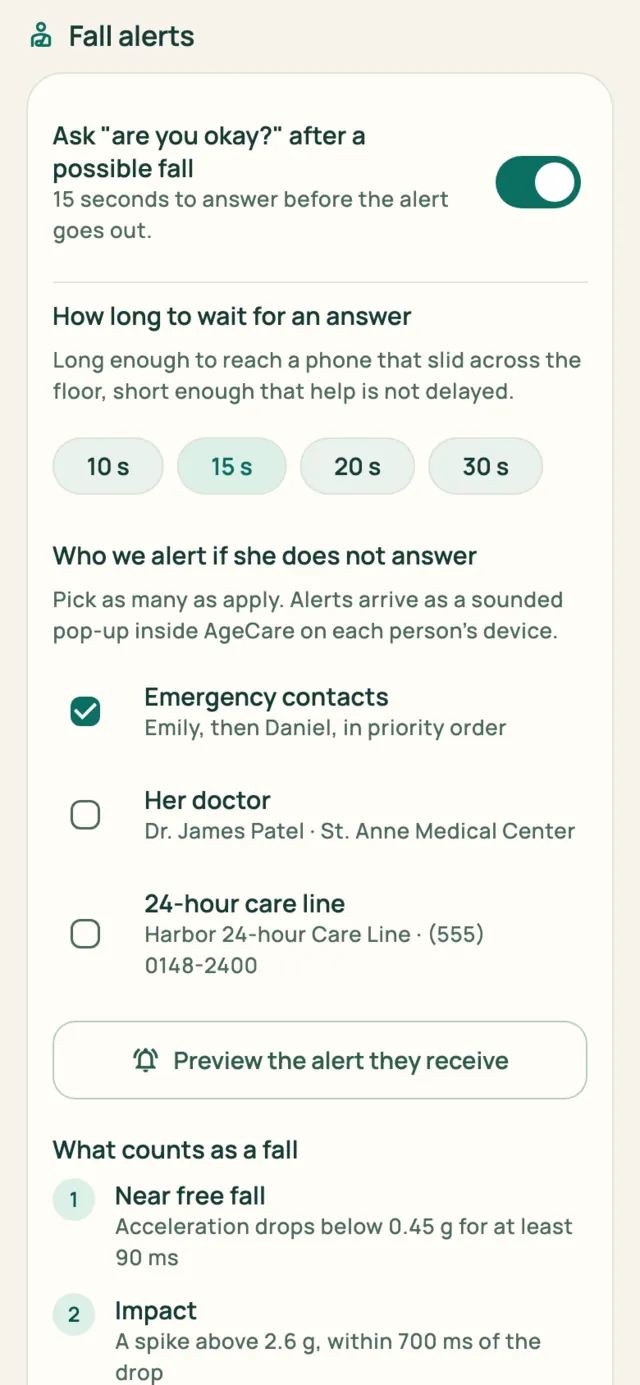
If the phone detects what looks like a fall, it asks one question in large type and waits fifteen seconds (or ten, twenty or thirty, your choice). Tap "I'm okay" and nothing happens beyond a note in the record. Say nothing, and the alert goes out.

Shake the phone to call for help
Four hard shakes starts the SOS countdown. It works without reading the screen, and a false alarm takes one tap to cancel.
Escalation
You choose who hears about it
Not every family wants the same call made. Some want their own contacts and nobody else. Some pay for a 24-hour nurse line and want it paged first. Some want the doctor told. Pick any combination, and set how long she gets to answer.
- Emergency contacts, in the priority order you set
- Her doctor, where you have shared emergency access with them
- A 24-hour care line, if your family subscribes to one
- Ten, fifteen, twenty or thirty seconds to answer
If nobody is selected, the app warns you instead of quietly doing nothing.
The alert
An alert you will actually notice
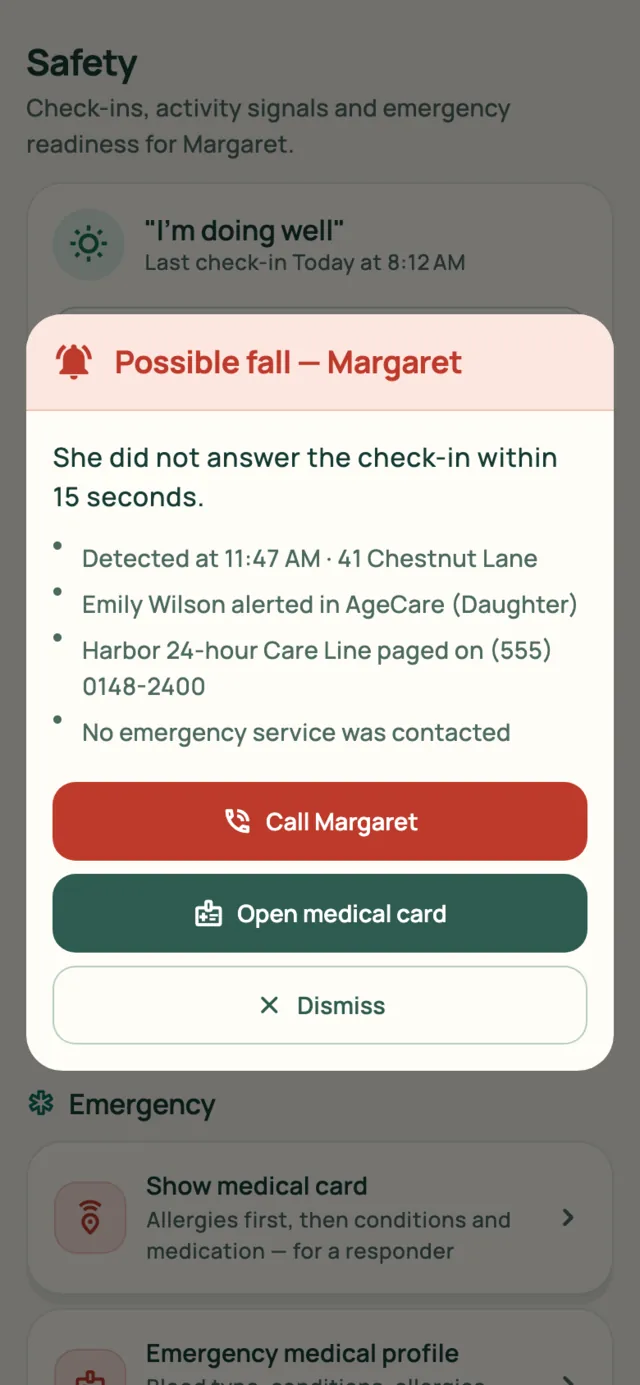
Everyone on the list gets a full-width alert that sounds and vibrates. It names what happened and when, lists who else was told, and puts the two useful actions right there.
- Call her, or open her medical card, in one tap
- The tone repeats until seen, so it isn't missed in a handbag
- Respects each person's Do Not Disturb and accessibility settings
The scannable card
A card that works without the app
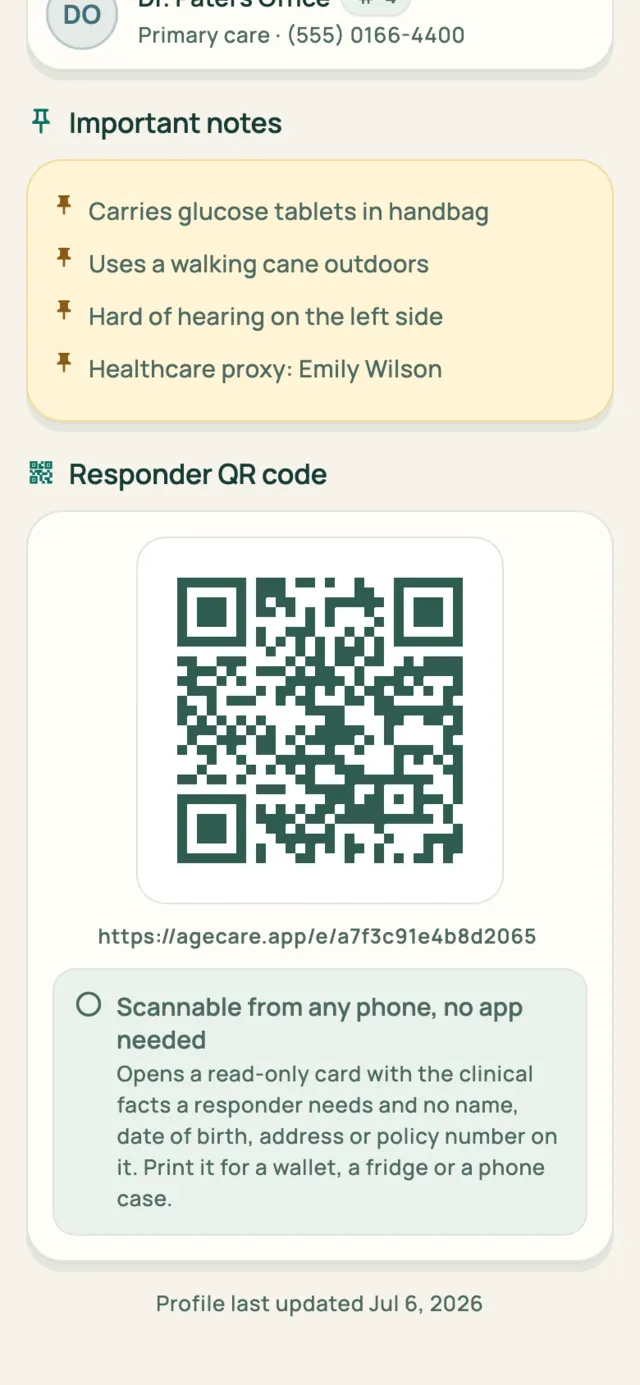
Paramedics won't have AgeCare installed, so every emergency profile comes with a QR code that opens a plain, read-only web page on any phone that scans it. Print it for a wallet, a fridge door or the back of a phone case, and it works even when her phone is locked, flat or across the room.
- No app, no login, no account. It opens in the camera
- Allergies first, then conditions, medication, blood type and who to call
- No name, date of birth, address or policy number on it
- You can turn the card off and print a fresh one at any time
The page is real, the person is fictional. Scanning the code in the screenshot takes you to the same place.

Location and safe zones
If she walks out at three in the morning, you know by five past
For a family living with dementia, the question isn't where she is all day. It's whether she has crossed a line she doesn't normally cross, at an hour she doesn't normally cross it. AgeCare watches the boundary, not the person.
Where she is
Her position, with the doubt drawn in
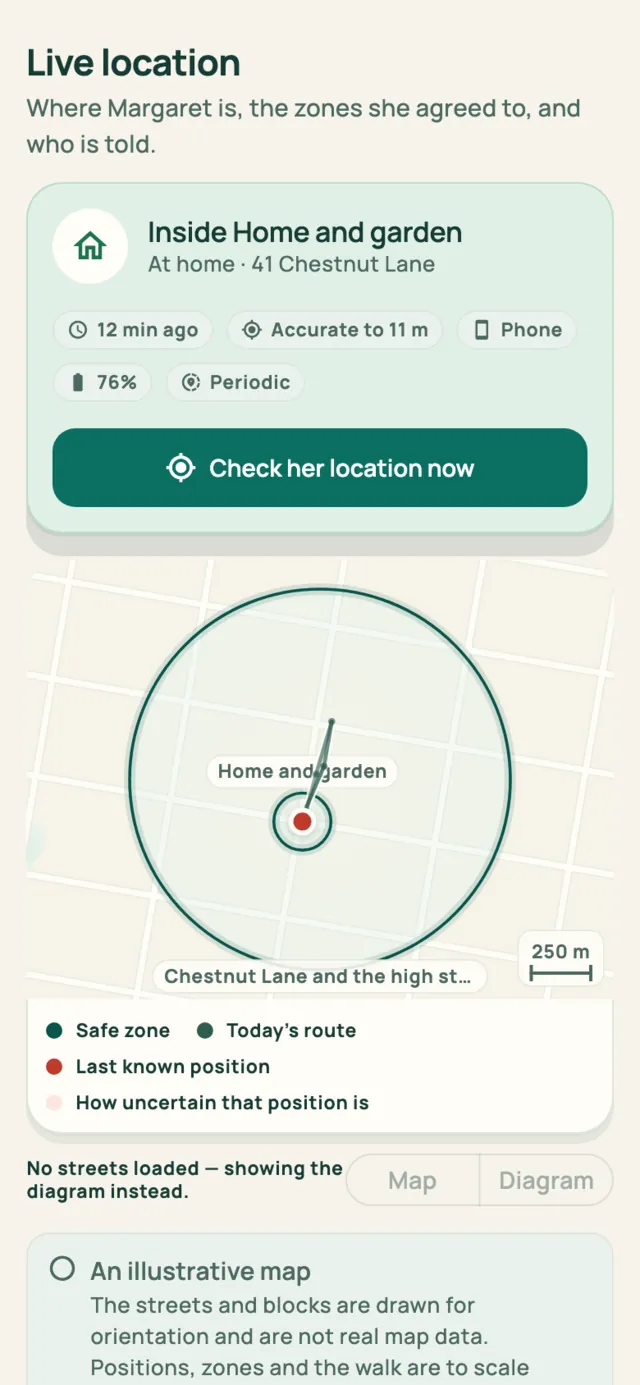
One card answers the question: which safe zone she is inside, what the place is called, how long ago that was measured and how much phone battery is left. Tap once to ask her phone again.
- Every fix says how accurate it is. "Accurate to 11 m" and "approximate, within 300 m" are different answers, and we never round the second one up into a pin on a doorway
- A fix older than your check interval is flagged, because a phone that is off, flat or out of signal looks exactly like someone who has stopped moving
- The day's route is drawn to scale beside the zones, so a walk to the shop reads as a walk to the shop
Safe zones
Circles you draw, rules you choose
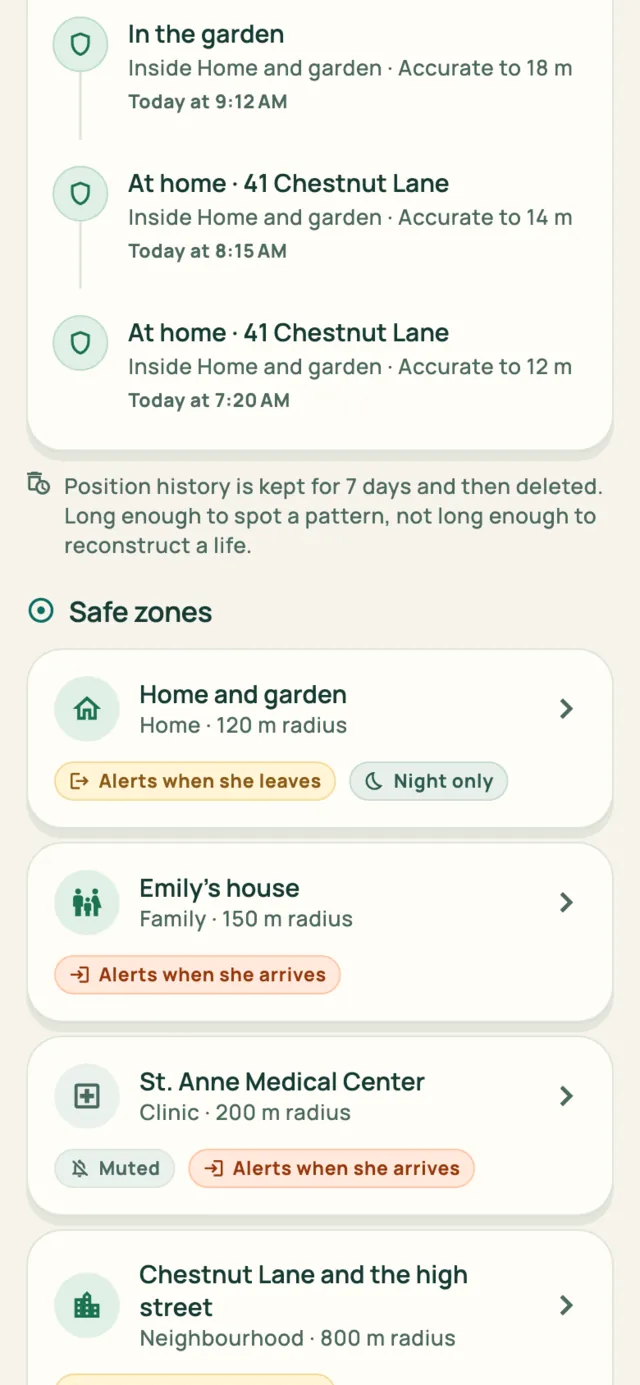
A safe zone is a circle on the map and one rule that goes with it. Her home and garden. The neighbourhood as far as the high street. Your house. The clinic. Each one alerts on the crossing you care about, and nothing else.
- Alert when she leaves, when she arrives, or neither. A zone can just be drawn
- Set a zone to night only: a walk to the corner shop at 10 AM is a good day, the same walk at 3 AM is the thing you asked to be woken for
- Mute a zone for a week without losing its shape
- Circles start at 100 m, because anything tighter drifts across its own boundary while the phone sits still on a table
Wandering alerts
An alert worth reading, not one you'll mute
One position over the line is usually signal drift or a neighbour's driveway. So the alert waits five minutes by default (or none, if you'd rather), and only then tells the people you picked, with her last position and the route she walked attached.
- The same escalation list as fall alerts: your emergency contacts, her doctor, a 24-hour care line, in any combination
- The crossing is the event. Being away never alerts you twice, so nobody gets paged all afternoon while she is at her daughter's
- You are told when she is back, because families who only get the leaving alert end up phoning to check
- Battery warnings arrive before the phone dies, not after it goes quiet
AgeCare tells the people you chose and stops there. It does not contact emergency services, and a location on its own is never treated as grounds to send anyone.
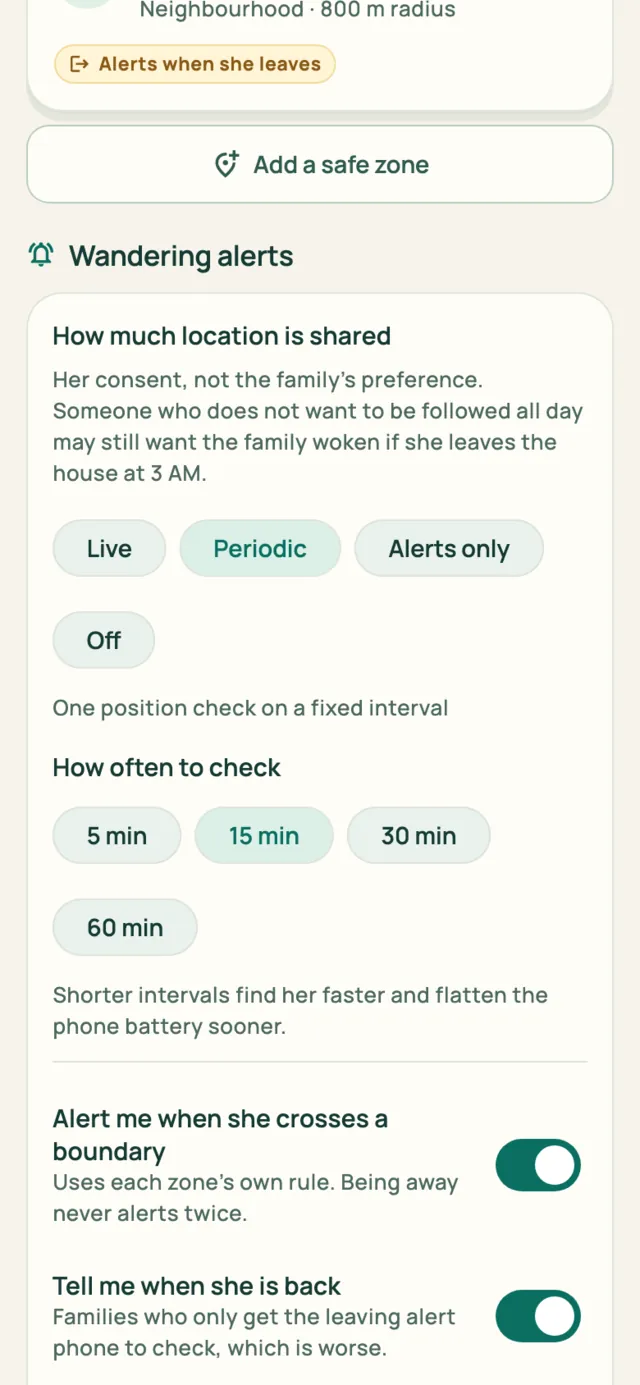
She decides how much of this happens
Location is the one signal a person can switch off without switching off her care. Sharing runs on a ladder: live, a check every few minutes, alerts only, or off. And alerts only is a real setting: no map, no history, and the family still gets woken if she leaves the house at night. Position history is kept for seven days and then deleted. Long enough to spot a pattern, not long enough to reconstruct a life.
Senior Mode
The interface she'll actually use
Most products in this category are built for the family alone, so everything the family sees is second-hand. Senior Mode is a fully separate interface: one column, plain language, at most six choices on a screen, large controls, no charts and no percentages.
The most important button in the whole app is "I have taken it", and she presses it herself.
- A live clock, the day, and what happens next
- Medicines with one clear action each
- People she recognizes, with photos and one-tap calling
- An enhanced-contrast mode she can turn on herself


Who it's for
One record, five points of view
Each person gets the screen their job needs, and only the data they've been granted.
The coordinator
The dashboard that answers "is she okay?": check-in, adherence, trends, today's visit, the next appointment and what needs someone.
The person being cared for
A simplified, high-contrast interface built for one-handed use, with the dose confirmation as the primary action.
A working shift
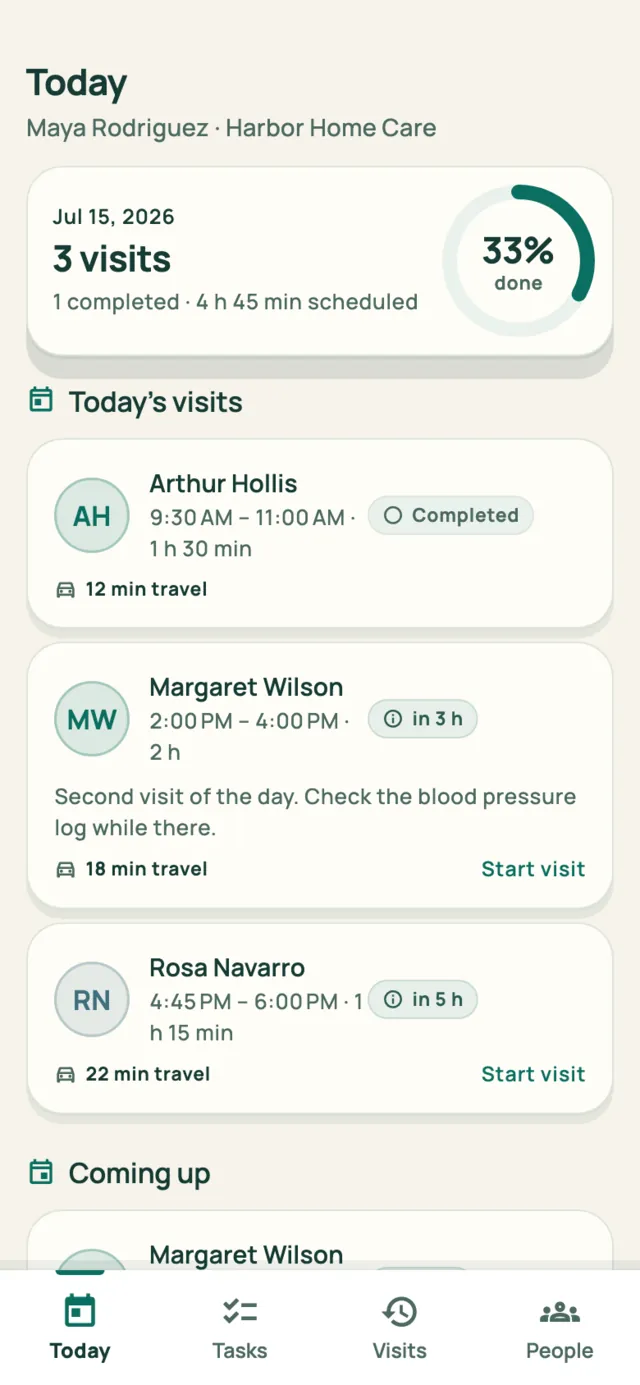
Check in, confirm the medication, complete the family's tasks, record a reading, write a note, check out, share a summary.
A narrow clinical view
Home-reported readings labeled as such, the medication list, adherence, and the questions the family submitted before the visit.
The operational layer
Residents, staffing, coverage gaps, alerts, certifications, visit documentation, analytics and a white-label family portal.
Private by default
Ten permissions, set per person and explained in plain language. Removing access takes effect on the next screen that person opens.
AgeCare Business
For home-care agencies and operators
Agencies usually lose contracts when families feel uninformed, not when care quality drops. In AgeCare, the summary a caregiver writes at the end of a visit is exactly what the family reads.

Residents & staff
Care records, risk filters, availability, certifications and rota coverage in one console.
Compliance
Visit documentation, certification expiry, and reports you can export when an audit comes.
Family engagement
Every family sees the visits, notes and summaries their own record contains.
White label
Your name and color on the family portal, with a live preview before you publish.
Pricing
Try AgeCare free for 14 days
Every account starts with a 14-day free trial. Cancel anytime, and your record stays exportable whether you pay or not.
Premium
or $399 a year
about $33 a month — save $80 a year
Core AgeCare monitoring for one person managing one parent.
- 1 monitored elderly person included
- Family dashboard and Senior Mode
- Medication tracking and reminders
- Health trends and wearable integration
- AI summaries, alerts and documents
14 days free, cancel anytime
Family
or $699 a year
about $58 a month — save $140 a year
Complete family care coordination around one shared record.
- Everything in Premium
- 1 monitored elderly person included
- Helpers are never charged: family and caregivers join free
- Shared dashboard, alerts and activity history
- Granular permissions and priority support
14 days free, cancel anytime
Security+
billed monthly
Weekly human wellness checks. Someone checks on your parent even when you're busy.
- Everything in Family
- Human wellness service for 1 person included
- A weekly wellness call, about 4 calls a month
- Missed-call follow-up and family escalation
- Monthly wellness summary
App trial free; human checks start with your plan
Security++
billed monthly
Advanced human monitoring and escalation. Even when you can't answer, someone is there.
- Everything in Security+
- Security++ protection for 1 person included
- 24-hour human response to emergency alerts
- Emergency coordination where legally and operationally supported
- Incident report and post-event follow-up
App trial free; human response starts with your plan
One monitored person is included in every plan. Add up to 3 additional monitored people for +$29.99/month each, software monitoring only. Human services (Security+, Security++, Concierge) cover one named person and are purchased per person. Family members and caregivers who help are always free.
Additional care services
For the weeks you can't be there in person
Physical and human services are offered region by region, only where AgeCare has vetted local partners. Availability is checked by country, state and ZIP.
AgeCare Watch
Not just a watch: a complete monitoring package. A year of Family plus a compatible smartwatch, shipped configured, paired and ready. About $83 a month, billed annually.
- 12 months of the Family plan
- Compatible smartwatch included
- Account, profile and wearable set up for you
Shipped ready to wear
Home Check
A vetted local visitor spends 45–60 minutes with your parent and reports back the same day: wellbeing, food and water, medication presence, basic home safety, photos with consent.
- Written report to the family
- Report lands in the AgeCare timeline
- Scheduled on provider availability
Offered where vetted partners operate
Urgent Home Check
Mom isn't answering and you're 2,000 miles away. You don't need an ambulance. You need somebody trustworthy to go now, not next week.
- Priority, same-day dispatch where available
- Everything in the standard Home Check
- Family updated as soon as the visitor arrives
Offered where vetted partners operate
Meal+
Recurring prepared-meal delivery through vetted local partners. 3 to 14 meals a week from a menu your parent chooses, with allergies and restrictions respected.
- 3, 5, 7 or 14 meals per week
- Menu chosen by the senior, visible to the family
- Delivery confirmations appear in the timeline
Priced by region and menu
AgeCare Concierge
Someone checks on your parent every day, for about $200 a day. Daily wellness calls, a dedicated care team, help coordinating appointments, and priority Home Check scheduling.
- Everything in Security++
- Concierge care for 1 person included
- A daily wellness call, about 30 check-ins a month
- Monthly care summary for the family
Limited seats per region
AgeCare's app never auto-dials emergency services: a human AgeCare operator handles escalation where the service is supported, and emergency coordination is available only in supported regions where AgeCare has the legal, operational and technical ability to provide it. Each human service covers one named person.
Trust
Built to be trusted with a parent's health
Here, plainly, is what AgeCare does and doesn't do.
The senior owns their record. They grant coordinator status, and they can move it to someone else. Every permission can be taken back, and monitoring is never hidden: if location or activity sharing is on, the person being cared for can see that it's on.
We don't sell health data, and we never will. Read the privacy commitments →
No diagnosis
Readings are compared with the senior's own recent range, and every health screen says the app is not giving medical advice.
No emergency dispatch
AgeCare does not contact emergency services. It prepares the information, and a person makes the call.
Private by default
Nobody sees new data until they are given access to it. A caregiver has no reason to see financial documents, and a clinician has no reason to read family conversations.
FAQ
Questions families ask
Does my parent have to use a smartphone?
Senior Mode is designed for someone who has a phone but doesn't enjoy using one: one column, large type, plain words and at most six choices. If they never open it, the family side still works. You just lose the confirmation that comes from your parent themselves, which is the part worth setting up for.
Can my parent see what I can see?
Yes, by design. Your parent owns the record, grants coordinator access, and can always see what is being shared about them. We don't think it's right to monitor someone in ways they can't inspect.
Isn't location tracking just surveillance?
It is, if nobody agreed to it. Location is a permission like any other in AgeCare: your parent can see who holds it, and withdraw it at any time. Sharing has an "alerts only" setting where the family sees no map and no history, and still gets told if she leaves her safe zone at night. History is deleted after seven days.
Is this a medical device?
No. AgeCare does not diagnose, does not screen for any condition, and does not replace clinical judgement. It compares a person with their own recent history, and every health screen reminds you that it isn't medical advice.
Will it call an ambulance?
No. AgeCare does not contact emergency services. It prepares the information a responder needs: allergies, conditions, medications, contacts and insurance. The decision stays with a person.
Our agency already has scheduling software. Why this?
Scheduling software keeps your rota full, but it doesn't keep families informed. AgeCare gives your caregivers a simple shift flow, and everything they record becomes what the family reads, under your branding.
What happens to our data if we stop paying?
Your record stays yours. Export is free at any time, and closing your account gives you a full export and then deletes the data. We don't sell health data, and we don't run ads.

Put the whole week in one place
Set it up in an evening. Invite your sibling, your parent's caregiver and your parent, each with their own view.